
Your desk mat should outlast your current keyboard switches
A twelve-dollar desk mat looks identical to an expensive one the minute you unbox it. The fabric is flat, the print is dark, and the surface feels smooth against your wrist. The problem with cheap desk accessories is that they do not fail on day one. They fail on day ninety, long after the return window closes and just slowly enough that you adapt to the degradation without noticing.
By month three, your forearm has rubbed the same five-inch patch of fabric forty thousand times. Your mouse sensor has tracked across the weave for hundreds of hours. The heat from your wrists and room has tested the adhesives holding the layers together. Here are the five specific failure points that separate disposable desk mats from surfaces built to stay on your workspace for years.
1. Edge fray and thread separation
Most budget mats cut production costs at the border. There are three common edge finishes on the market:
- Raw cut edges: The fabric and rubber are simply sliced with a blade. Within eight weeks, the fabric layer lifts from the rubber base where your wrist rests.
- Loose decorative stitching: The edge has thread loops, but they sit higher than the mat surface. Your mouse cord catches on every swipe, and the thread frays into fuzz.
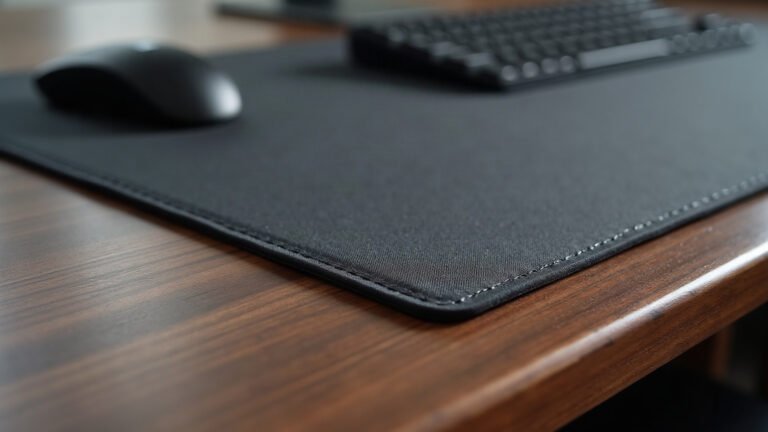
- Tight, flush overlock stitching: The thread density is high and presses down into the rubber base so the edge sits level with the gliding surface.
When stitching sits higher than the mat, it creates physical resistance against your mouse cable or the edge of your hand. Look for flush edge stitching with high stitch-per-inch density so the yarn cannot unravel when your sleeve brushes across it.
2. Base degradation and desk staining
A desk mat stays in place through friction between its base and your desk surface. Cheap mats typically use low-grade PVC foam or synthetic ethylene-vinyl acetate (EVA). Quality mats use natural open-cell rubber with a textured herringbone or cross-hatch grip.
Synthetic foam bases suffer from two issues after three months of daily use:
- Compression memory: The foam under your keyboard permanently flattens to less than one millimeter, creating an uneven dip across your desk.
- Plasticizer leaching: Cheap synthetic compounds can react with lacquered wood, oil finishes, or certain laminate desks. The rubber breaks down into a sticky residue that transfers onto the desk surface.
Natural rubber with a textured bottom maintains its 3 mm or 4 mm height consistently across the entire pad, keeping your setup level regardless of where you rest heavy hardware.
3. Surface glaze and high-friction dead zones
Every desk mat encounters skin oils, dust, and friction. High-density polyester micro-weave handles this through tight yarn geometry. Low-thread-count fabrics do not.
On a cheap mat, friction from your mouse skates and palm flattens the loose polyester fibres into a smooth, shiny patch. In competitive circles, this is known as a slow spot or dead zone. Your mouse glides easily across the corners of the mat, but bogs down directly in the center where you aim or navigate spreadsheets. Once a cheap weave is polished flat by friction, no amount of washing restores its original glide.
4. Ink breakdown and color wash
How the artwork gets onto the mat determines whether the design survives past ninety days. Budget manufacturers spray surface pigment directly onto finished cloth. Premium makers use heat dye-sublimation.
| Feature | Surface Screen Print | Dye-Sublimation |
|---|---|---|
| Ink Placement | Sits on top of fibres | Infused into polyester yarn |
| Texture Feel | Rubbery or scratchy | Indistinguishable from bare cloth |
| Month 3 Result | Cracks and fades to grey | Retains original contrast |
| Washability | Flakes off with mild soap | Safe for cold hand washing |
Dye-sublimation uses heat to turn solid dye into gas, bonding it directly to the polyester fibres at a molecular level. The print cannot peel, flake, or alter the friction coefficient of your mouse glide, even after months of constant forearm contact.
5. Internal warping and corner lift
Have you ever seen a desk mat where the left and right edges curl upward like a scroll? That happens when the top fabric and bottom rubber shrink at different rates under normal room humidity and temperature changes.
When a manufacturer glues pre-stretched fabric onto unrelaxed rubber, internal tension remains trapped inside the mat. After three months of seasonal temperature shifts, the glue bond weakens slightly, and the trapped tension forces the corners to lift off your desk. A quality desk mat uses fully relaxed rubber cured before lamination, ensuring it lies flat on day one and stays flat on day five hundred.
How to test your current setup right now
You do not need to buy anything to check the condition of your current mat. Run these three quick checks at your desk today:
- The fingernail drag: Drag the back of your fingernail across your high-use mouse area, then across an unused corner. If the resistance feels noticeably different, your surface weave has degraded.
- The edge pinch: Pinch the stitched border between two fingers and pull gently outward. If the thread loops spread apart and reveal the rubber core, the stitch density is too loose to survive long term.
- The corner press: Lift one corner of your mat two inches and let it drop. If it takes more than three seconds to settle completely flat against the desk surface, the base compound has hardened.
Choosing your next desk surface
When you are ready to refresh your workspace, look for specific construction standards rather than brand hype. Check that the mat uses a 3 mm or 4 mm natural rubber base, tight flush overlock edge stitching, and dye-sublimated micro-weave polyester.
If you prefer a clean look with precise tracking across your entire workspace, our curated collection of desk mats is built to these exact production specifications. Every mat is printed to order using deep dye-sublimation on natural rubber backing, with edge stitching designed to stay flat against your wrists.
Production takes two to five business days before shipping, with free standard delivery across the United States. Measure your desk width with a tape measure first to ensure you pick the footprint that leaves clean margins on both sides of your keyboard.
Lana is MousePady’s brand character — an AI-generated persona created and written by us, not a real person and not a real reviewer. Specifications come from manufacturer data.

Leave a Reply