
A desk looks messy when your eyes have to process too many competing edges, colors, and heights at the same time.
You can wipe the surface, file every document, and center your keyboard. If the visual weight across the tabletop is unbalanced, your brain still reads the room as cluttered. Tidiness is about storage. Visual order is about geometry, contrast, and alignment.
The Problem of Micro-Clutter and Floating Objects
When five individual objects sit directly on a bare wooden or white surface, your brain registers five separate borders. Add a mouse, a keyboard, an audio interface, a phone stand, and a coaster, and you now have ten distinct high-contrast boundaries against the desktop.
This is called visual noise. Even when every item is clean and functional, the sheer number of exposed boundaries creates visual friction. The eye jumps from the edge of the keyboard to the edge of the mouse, then down to the coaster. Nothing tells the eye where the working zone begins or ends.
The Solution: Group Items into a Single Visual Island
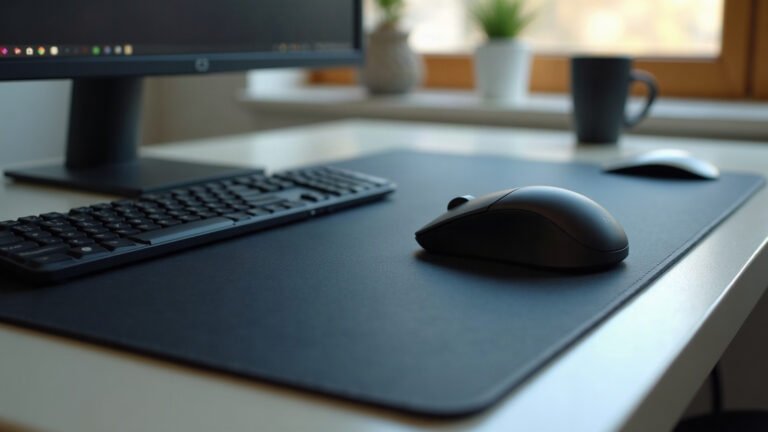
To fix floating objects, you group them onto a single foundation layer. When you place a keyboard and mouse together on a single base, five visual objects become one cohesive zone.
A simple textile layer defines the perimeter. Instead of scanning five distinct objects, the eye registers one clean boundary. Placing your primary tools on wide desk mats anchors the entire center of the desk, hiding the harsh contrast between peripheral plastic and tabletop laminate.
The 90-Degree Rule for Peripheral Alignment
Human vision notices diagonal angles and slight misalignments instantly. When objects sit at three-degree or seven-degree tilts relative to the edge of your desk, the setup appears haphazard, even if those items are technically put away.
Pick one alignment rule and enforce it across every object on the desk:
- Parallel to the front edge: The keyboard, audio interface, and notebook stay parallel to the front table edge.
- Perpendicular to the front edge: Secondary items like stream controllers, tablet stands, or external hard drives sit at exact 90-degree angles.
- Intentional 45-degree angles: If a secondary monitor or macro pad must angle toward your seat, set it at an intentional 45-degree angle rather than a lazy five-degree drift.
Straight parallel lines tell the brain that the placement is deliberate. Deliberate placement reads as calm and structured.
Visual Clutter vs. Functional Order
Use this reference table to identify what makes a clean desk look visually chaotic from the doorway, and how to correct the physical layout:
| Visual Symptom | Underlying Cause | Structural Fix |
|---|---|---|
| Surface feels crowded despite few items | High contrast between peripherals and desk surface | Anchor central items on a single neutral base mat |
| Desk looks crooked from a distance | Objects set at random 5-degree tilts | Align all gear parallel or perpendicular to the desk edge |
| Setup feels visually heavy on one side | Monitor or tall speakers clustered to the left or right | Redistribute tall hardware to frame the central workspace |
| Tabletop appears broken up | Multiple small pads and loose coasters | Replace separate small mats with one unified work surface |
| Back wall looks busy behind monitors | Exposed wall plugs and hanging cables | Route cables strictly behind monitor arms and desk legs |
Controlling Color and Material Scatter
Material scatter happens when a desk collects too many distinct textures. A walnut desktop with a silver aluminum laptop stand, a glossy black monitor bezel, a braided white cable, a neon mousepad, and a ceramic mug creates six different texture stops.
To make the desk look peaceful, limit your setup to three primary materials:
- Base foundation: Your desk surface (for example, light oak or matte black laminate).
- Hardware frame: The chassis of your gear (for example, matte black anodized aluminum).
- Accent layer: One soft texture or consistent accent color across your pad and desk accessories.
If you use a mouse surface, ensure the print or fabric tone harmonizes with the desk rather than shouting over it. An understated surface from the mouse pads collection provides a uniform texture that absorbs visual distractions instead of creating them.
Height Variation and the Horizon Line
A tidy desk often looks chaotic because of broken vertical lines. When your eyes move horizontally across the desk, dramatic jumps in height make the setup feel jagged.
Consider the horizon line of your hardware. A tall vertical monitor next to an ultra-low laptop screen, followed by a mid-height desktop microphone, creates a zigzag pattern. You can balance this by managing your vertical spacing:
- Mount displays on adjustable arms so the top edges sit at an even, horizontal plane.
- Keep desktop speakers symmetrical relative to the monitor edges.
- Store tall accessories (like headphone stands) toward the back corners, never in front of displays.
The first week you clear your desk line, you will catch yourself glancing into the room just to see how calm the table looks without jagged vertical interruptions.
Choosing the Right Base Dimensions
Before adding any desk mat or base layer to unify your setup, pull out a tape measure. A base that is too small leaves your keyboard hanging over the edge, creating another awkward visual border. A base that is too large covers cable grommets or hangs over the edge of the desk.
Measure the width of your desk, then measure the total footprint of your keyboard and the mouse travel area you actually use. Choose a surface that leaves at least 100 mm of bare desktop on either side to maintain a clean border frame.
MousePady mats are produced on demand, which takes 2 to 5 business days before dispatch (up to 10 days during peak seasonal volumes). All orders ship free across the United States, with flat-rate shipping from $7.95 elsewhere, and free international shipping on orders over $99. Every item is backed by our 30-day print guarantee: if your mat arrives misprinted, damaged, or lost in transit, send a clear photo within 30 days for an immediate replacement or full refund without returning the item. Note that because each product is printed specifically for your order, we do not accept change-of-mind returns.
Take the First Step Today
You do not need to replace all your hardware to get a calm workspace. Start with five minutes of physical alignment.
Stand up, walk to the doorway of your room, and look at your desk with fresh eyes. Identify the floating items, straighten every diagonal edge to a crisp 90 degrees, and align your peripheral heights. Once the geometry is square, you will have a desk that looks genuinely clean.
Lana is MousePady’s brand character — an AI-generated persona created and written by us, not a real person and not a real reviewer. Specifications come from manufacturer data.

Leave a Reply