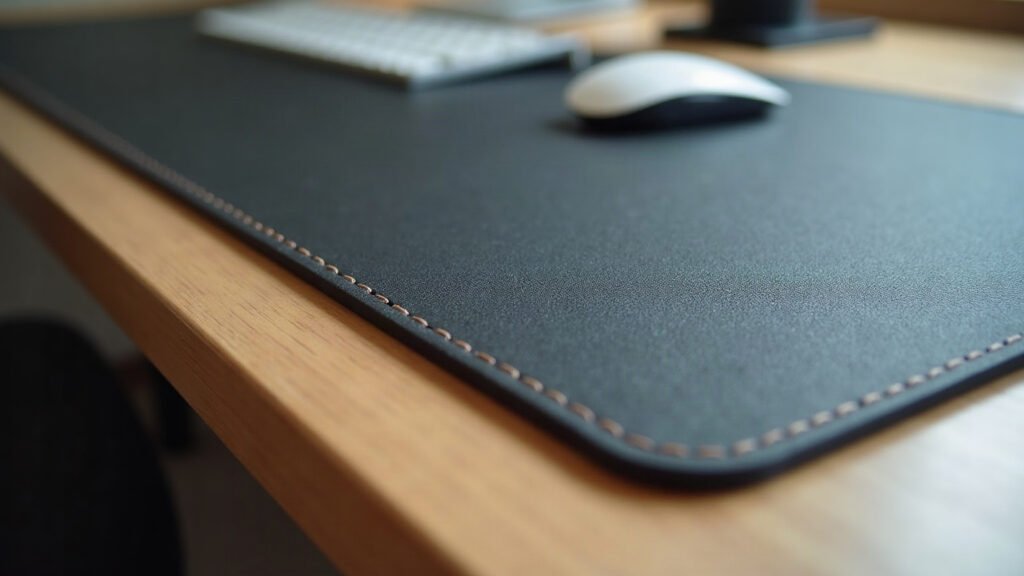
The front edge of a desk pad takes more abrasive wear in one working day than the top surface takes in a month. On a compact mouse pad, your hand hovers over the center or pivots lightly on a heel of palm. On a 48-inch surface, your forearms rest directly across the bottom border for eight to ten hours at a time, grinding skin oils, clothing fibers, and lateral friction straight into the seam where woven polyester meets rubber backing.
The Contact Patch: Forearm Shear Versus Mouse Glide
A standard 24-inch pad sits under your mouse hand. The bottom edge rarely takes direct, weighted pressure because your wrist stays mobile, and your keyboard rests on bare desk beside it. The mechanical stress on that edge is intermittent and light.
A 48-inch mat spans your entire workstation. It sits under your mechanical keyboard, your mouse, your notebook, and both forearms. Every time you shift between typing and mousing, your forearms drag across the lower edge. In physics terms, this is continuous shear stress applied to a bonded laminate edge.
The Mechanical Layers of a Desk Mat
Almost all modern desk pads use a two-layer composite construction:
- Top surface: A tightly woven polyester or micro-fiber fabric engineered for optical sensor tracking.
- Base layer: An anti-slip open-cell rubber or natural rubber foam, typically 3 mm to 4 mm thick.
- Bonding agent: A heat-activated adhesive layer that fuses the cloth to the rubber core.
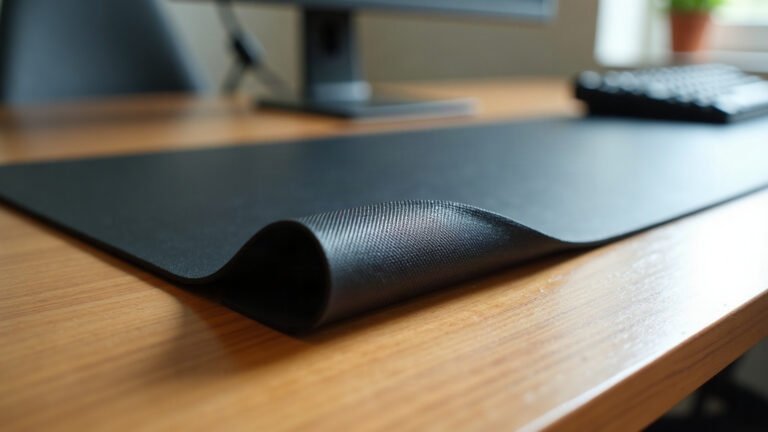
Without stitching, that adhesive line is the only thing holding the surface flat. When you press your arms down, body heat softens the glue slightly. When you pull your arms backward, your skin drags the fabric away from the rubber. On a short pad, this causes minor fraying after a year. On a 48-inch mat, a raw-cut edge begins separating at the center within eight to twelve weeks.
The Perimeter Math: Why Surface Area Accelerates Wear
As mat size doubles, perimeter length scales dramatically, but user contact points concentrate almost entirely on one single line: the front horizontal border.
Consider the structural numbers between standard and full-desk dimensions:
| Specification | 24-Inch Mouse Pad | 48-Inch Extended Mat |
|---|---|---|
| Approximate Dimensions | 24 x 14 inches (60 x 35 cm) | 48 x 24 inches (120 x 60 cm) |
| Total Perimeter | 76 inches (190 cm) | 144 inches (360 cm) |
| Active Forearm Contact Area | 4 to 6 inches along front edge | 28 to 36 inches continuous span |
| Daily Lateral Drag Cycles | Low (wrist lift) | High (dual forearm tracking) |
| Primary Failure Mode Without Stitches | Corner curling | Front-edge cloth delamination |
On a 48-inch mat, you expose nearly three feet of continuous edge to active body contact. If that edge is a raw, laser-cut, or heat-sealed border, the fabric will pill, lift, and roll upward into a white ridge where your skin meets the desk lip.
The Two Types of Edge Stitching
Not all stitching handles continuous arm weight the same way. When examining stitched edges on large surfaces, look at the thread density and the height profile relative to the mat surface.
1. Standard Overlock Stitching
Standard overlock stitching loops heavy thread over the top and bottom of the mat edge. It creates a durable barrier against fraying. However, if the stitch is too tall or uses coarse nylon thread, it forms a raised bump that digs into your wrists during typing sessions. If you choose an overlocked mat, ensure the thread is a soft micro-filament rather than stiff mono-filament nylon.
2. Flush Flat-Lock Stitching
Flush flat-lock stitching sinks the thread loops into the compressed rubber core, bringing the seam level with the fabric surface. The thread binds the polyester face directly to the rubber base without creating a raised border. For extra-large surfaces like our desk mats, a tight 3 mm edge stitch prevents delamination while keeping the border flat against your desk.
How to Test Your Current Setup
You can check whether your current desk setup requires a reinforced edge by running three quick checks before choosing a replacement:
- Desk Lip Check: Run your fingers along the front edge of your desk. If your desk has a sharp 90-degree corner, any non-stitched mat resting near that edge will sheer through its adhesive twice as fast due to downward pinch pressure.
- Forearm Positioning: Sit at your desk in typing position. Note where your arms make contact. If your skin touches the boundary where the mat meets the wood, you need edge reinforcement across that entire width.
- Wipe-Down Direction: When cleaning a mat, people wipe downward toward the floor. On raw edges, this regular cleaning pulls the cloth off the rubber. Stitched edges allow you to wipe in any direction with a damp microfiber cloth without catching the border.
Why Smaller Pads Can Sometimes Skip the Stitch
If you use a standalone 12-inch or 24-inch mouse pad positioned purely for competitive low-DPI gaming, raw edges occasionally have a valid purpose. Some tournament players prefer zero border friction if their mouse skates frequently cross the outer boundary of the pad during wide arm swipes.
On a 48-inch surface, your mouse never touches the outer edge. Your mouse operates in an isolated zone in the right or left third of the mat. The outer edges exist purely as anchor points and arm rests. Eliminating the stitch on a 48-inch mat gives you zero tracking benefits while compromising the structural life of the material.
What to Look for Before You Decide
Before purchasing an extended mat, measure your usable desk depth and width with a steel tape measure. Allow at least one inch of clearance between the back edge of the mat and your monitor arms or cable grommets so the edge lays completely flat.
We print our extended mats to order on 3 mm natural rubber bases with reinforced perimeter stitching to keep the artwork and the structural layers locked together over years of daily typing. Production takes 2 to 5 business days before dispatch. Shipping is free across the United States on every order, with flat-rate shipping worldwide from $7.95 (or free on orders over $99).
If your mat arrives damaged, misprinted, or defective in transit, send us a clear photo within 30 days and we will issue a free replacement or a full refund without requiring a return.
Specifications come from our suppliers’ published data. Where we link to gear we do not make, those links may earn us a commission at no extra cost to you.


Leave a Reply