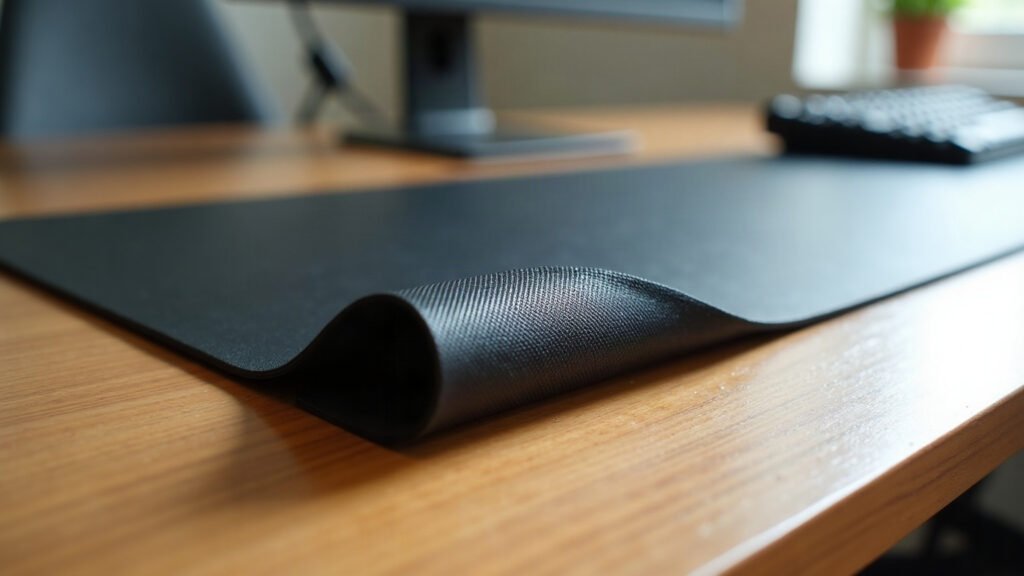
A desk mat slides because dust acts like microscopic ball bearings beneath it, not because the material lost its grip. When a mouse pad creeps forward during use, friction has broken down at the contact points between the base and your desktop surface.
A shifting pad ruins muscle memory. Every millimeter of lateral drift alters cursor travel and keyboard alignment. Leaving an unstable mat on your desk forces constant micro-adjustments throughout the working day.
The first week you use a properly weighted base on a clean surface, you will catch yourself forgetting the mat even exists underneath your hands.
The Three Main Non-Slip Base Materials
Manufacturers use three primary materials for mouse pad bases: natural open-cell rubber, synthetic styrene-butadiene rubber (SBR), and molded silicone. Each behaves differently under pressure, heat, and skin oils.
1. Natural Open-Cell Rubber
Natural rubber comes from latex sap. In mouse pad production, manufacturers foam this latex to introduce microscopic air pockets, then emboss a herringbone or cross-hatch texture on the bottom. The open cells act like tiny suction cups against smooth surfaces. A 3 mm thick natural rubber base provides substantial mass, holding its position through sheer surface area and downward weight.
2. Synthetic SBR and EVA Foam
SBR is a petroleum-based synthetic rubber commonly blended with plasticizers. EVA is a cheaper, lightweight closed-cell foam often found on budget marketplace pads. These materials weigh roughly half as much as natural rubber. Because they lack dense mass, they rely almost entirely on aggressive surface texturing to resist movement. They are prone to sliding on low-friction surfaces like varnished hardwood and laminate.
3. Molded Silicone and Polyurethane (PU)
Silicone and polyurethane bases offer high natural tackiness without relying on weight. They adhere exceptionally well to non-porous surfaces like tempered glass and polished stone. However, silicone does not breathe. If moisture or dust gets trapped underneath, the suction breaks immediately and the entire mat floats across the desk.
Base Material Comparison
How the primary non-slip backing materials perform across grip strength, lifespan, and desk surface types:
| Material | Grip Mechanism | Lifespan | Best Desk Surface | Common Failure Point |
|---|---|---|---|---|
| Natural Rubber (3 mm) | Mass + open-cell suction | 3 to 5 years | Wood, laminate, metal | UV exposure and drying |
| Synthetic SBR Foam | Surface texture only | 1 to 2 years | Textured laminate | Hardening and loss of flexibility |
| EVA / Craft Foam | Mechanical bite | 3 to 6 months | Unfinished wood | Crushing and flattening |
| Molded Silicone / PU | Adhesive tackiness | 2 to 4 years | Glass, polished stone | Dust contamination |
What Fails First: The Chemistry of Degradation
Non-slip bases do not wear down from friction. They fail because of environmental exposure and chemical breakdown.
Plasticizer Migration
Budget synthetic pads rely on chemical plasticizers to stay flexible. Over 6 to 12 months, these oils migrate out of the foam. The base turns brittle, smooth, and hard. Once the base loses its elastic compliance, it can no longer settle into the micro-textures of your desk surface, and sliding begins.
Hydrolysis and Oxidation
Natural rubber degrades through exposure to ozone, direct sunlight, and ambient humidity. UV rays break the polymer chains, causing the bottom layer to oxidize. In dry environments, old rubber flakes into black powder. In humid environments, low-grade rubber can become sticky and leave residue on lacquered timber.
Dust Accumulation
Dust is the most common reason a base stops holding. Fine particles settle under the edges of the mat, filling the textured grooves. Once those grooves fill with debris, the rubber contacts the dust rather than the desk surface, reducing static friction to near zero.
How to Restore Grip Without Buying a New Mat
Before replacing a slipping pad, clean the contact layer. You can often restore total stability in five minutes with zero spend.
- Clear and wipe the desk: Remove the mat. Clean the desk with a damp microfiber cloth and a drop of mild dish soap to strip skin oils. Let it dry completely.
- Clean the rubber base: Wipe the underside of the pad using a damp microfiber cloth. Do not use alcohol, bleach, or solvent-based sprays on natural rubber; solvents dissolve the surface layer and accelerate breakdown.
- Tack clean with tape: If dust remains in the micro-grooves, press wide masking tape or packing tape against the base and peel it away. The adhesive pulls out embedded lint without damaging the textured cells.
- Check desktop moisture: Ensure both surfaces are bone dry before laying the pad back down. Trapped moisture prevents the rubber from gripping.
Matching the Base to Your Desk Surface
Different desktop materials require different base characteristics to stay anchored under heavy mouse sweeps.
Lacquered or Oiled Wood
Solid timber needs a breathable natural rubber backing. Closed-cell silicone backings can trap moisture against wood finishes, creating clouding in the lacquer over time. Natural rubber provides high friction without reacting chemically with cured polyurethanes or oil finishes.
Tempered Glass and Polished Stone
Glass has no grain or texture for foam to bite into. Lightweight EVA pads slide across glass instantly. Natural rubber mats need sufficient thickness—at least 3 mm—to create a solid vacuum seal against glass. Alternatively, polyurethane and silicone bases adhere firmly to glossy surfaces.
Standard Melamine Laminate
Laminate desks feature a slight micro-texture. Dense open-cell rubber is ideal here, as the weight of the mat pushes the rubber into the micro-crevices of the laminate sheet.
Choosing Your Next Desk Mat Base
If your current pad is lightweight EVA or thinning foam, cleaning will not solve the issue. A mat that weighs under 200 grams lacks the downward force required to hold its ground during fast forearm movements.
When you browse our desk mats, you will find 3 mm natural rubber backings across all sizes, from 12×18 inches up to 18×36 inches. That thickness gives the mat structural mass, while the anti-fray stitched perimeter prevents the cloth surface from peeling away from the rubber core over time. For smaller footprints, our mouse pads use the same dense natural rubber construction to prevent movement on tight workspaces.
We make our mats to order in 2 to 5 business days, ship free anywhere in the United States, and back every print with our 30-day fault guarantee. If your mat arrives with any defect or print error, send a photo within 30 days for an immediate replacement or full refund.
Before you choose a size, take a tape measure to your desk. Measure your keyboard width, add 10 to 12 inches for mouse sweep, and select the dimensions that anchor your workstation.
Specifications come from our suppliers’ published data. Where we link to gear we do not make, those links may earn us a commission at no extra cost to you.


Leave a Reply